Jot for Flutter
In-app feedback for Flutter, pinned to the widget.
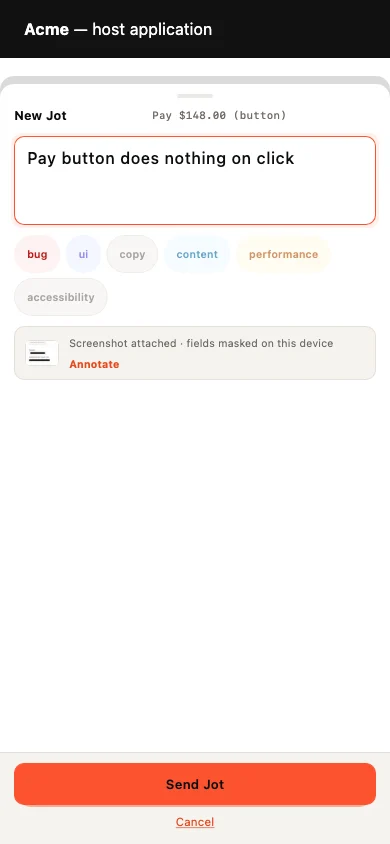
Wrap your app once. Reviewers tap the broken thing on the real screen and type one sentence; your team gets the screen, the widget, a masked screenshot and the device, and, when they record, video with console, network and crashes.
Install
flutter pub add usejot
import 'package:usejot/usejot.dart';

void main() => runApp(
  Jot(projectKey: 'jot_pk_…', child: const MyApp()),
);
Your project key is in the dashboard once you create a project. Full Flutter guide
What you get
Every report arrives ready to fix.
- The reviewer's sentence and labels, pinned to the element
- A screenshot, masked on the device
- The screen and the element
- The device and its operating system
- On Record: video with console and network
Made for Flutter
What is specific to Flutter
- Give your MaterialApp Jot.navigatorObserver and every pin is named by its screen.
- JotAnchor(id: 'checkout.pay') names the widgets that matter, so their pins land exactly on any device.
- Works on iOS, Android, macOS, Windows, Linux and the web.
- Open Jot from your own UI with Jot.open(), or switch the button for a slim edge tab.
Questions
Is anything sensitive captured?
Masking happens on the device, before a screenshot or recording exists. Password fields are always blacked out; wrap anything else in JotMask.
Which versions are supported?
Flutter 3.41 or later, iOS 13+, Android 7 (API 24)+ and macOS 11+.
Do reviewers need an account?
They never need a dashboard login. On a public project they type and send; on a members-only project they confirm a 6-digit code emailed to them, inside the widget. Reviewers are free and unlimited on every plan.
Also on: JavaScript · React · Next.js · Vue · Nuxt · Svelte · Angular · React Native. Send Jots to: GitHub · Linear · Jira · Trello · Microsoft Teams
Your first Jot is a minute away.
Start free. Reviewers are always free, on every plan.